


Walk through almost any clinic at the end of the day, and you will see the same scene repeating itself. The front desk staff are still finishing tomorrow’s schedule. A nurse followed up on insurance verifications that should have been done before the patient arrived. A biller is chasing down a claim that bounced back for a coding mismatch nobody caught in time. None of this is clinical work, and yet it consumes a significant share of every healthcare team’s day.
Administrative overhead now accounts for close to a third of total healthcare spending in the United States, and most of that cost is not tied to complex decision-making. It comes from repetitive, rules-based tasks that computers handle far more reliably than overworked staff trying to keep up with patient volume. That gap is exactly where AI workflow automation has started to make a measurable difference.
| KEY STATS AND BENCHMARKS | |
| 30% | of total healthcare spending in the US goes toward administrative costs rather than direct patient care |
| 50% | average reduction in appointment no-shows when automated reminders and rescheduling are in place |
| 35% | faster claims processing reported by practices using automated billing and claim scrubbing workflows |
| 24/7 | availability for digital intake, self-scheduling, and automated patient communication, regardless of office hours |
| 2-3 Hrs | of daily staff time often recovered per front-desk role after automating routine scheduling and intake tasks |
What Workflow Automation Actually Looks Like in a Clinical Setting
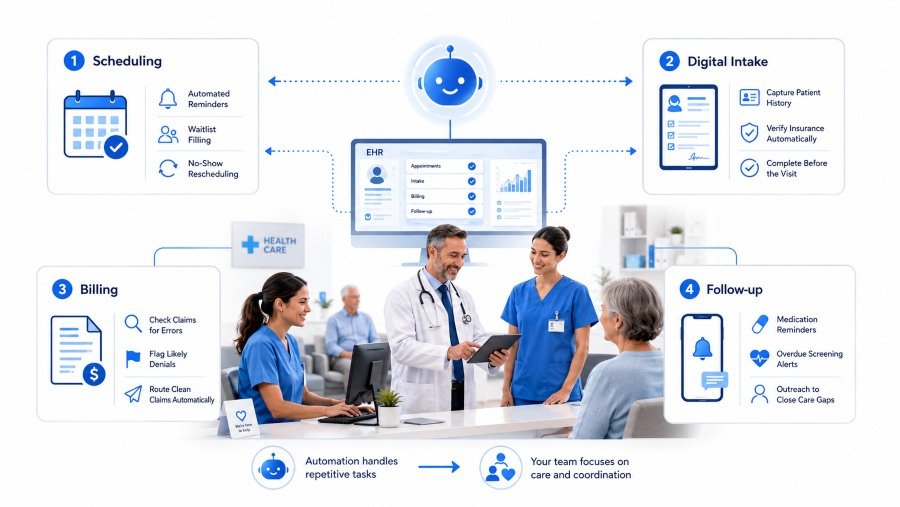
The phrase gets used loosely, so it helps to be specific. Workflow automation in healthcare does not mean replacing staff or removing clinical judgment from decisions. It means handing off the predictable, repetitive parts of a process so people can spend their time on the parts that actually require a human.
A few examples make the distinction clear:
- A scheduling system that automatically reminds patients, fills cancellations from a waitlist, and reschedules no-shows without anyone making a phone call.
- An intake process that captures patient history and insurance details digitally before the visit, instead of a clipboard and a fifteen-minute wait in the lobby
- A billing workflow that checks claims for errors before submission, flags ones likely to be denied, and routes clean claims automatically
- A follow-up system that sends medication reminders and flags overdue screenings without staff having to track every patient manually
None of these examples involve a machine making a clinical decision. They involve a machine handling the parts of the process that were never really decisions to begin with, just steps that had to happen correctly and on time.
Mapping Automation Across the Patient Journey
The easiest way to understand where automation creates value is to follow a single patient from the moment they try to book an appointment to the moment their claim is paid. Almost every stage in that journey has a manual bottleneck that automation can absorb.
Scheduling is usually the first place practices automate, partly because the return is so visible. No-show rates drop noticeably once reminders go out automatically and patients can reschedule themselves without waiting on hold. Intake follows close behind, since digital forms that feed directly into the EHR eliminate the redundant data entry that frustrates both patients and staff.
The clinical visit itself benefits from automation more subtly, through ambient documentation and decision support that surfaces relevant history without the physician having to dig for it. Billing and coding are where the financial impact tends to be largest, since claim errors caught before submission save weeks of rework. Follow-up care, often the most neglected stage, becomes far more consistent when reminders and care gap alerts run automatically instead of depending on someone remembering to check.
Why Generic Automation Tools Often Fall Short in Healthcare
Plenty of off-the-shelf automation platforms exist, and many practices have tried bolting one onto their existing systems with mixed results. The reason is usually structural rather than a failure of the tool itself. Healthcare workflows are tightly coupled to the EHR, to payer-specific billing rules, and to clinical processes that vary by specialty in ways a generic platform rarely accounts for.
A scheduling automation tool that does not understand provider-specific visit types ends up creating more manual correction than it saves. A billing automation tool that cannot map cleanly to a practice’s specific payer mix produces false flags that staff have to chase down anyway. The promise of automation only holds when the system is actually built around how the organization works, not the other way around.
A Common Mistake to Avoid
Automating a broken process makes the broken process happen faster. Before automating any workflow, it is worth mapping out exactly where the manual steps occur, who owns each one, and why they exist in the first place. Some steps turn out to be unnecessary altogether once examined closely.
Why Customization Matters More Than the Platform Itself
This is where many implementations succeed or fail. A health system with three different EHR instances across its facilities, a multi-specialty group with wildly different visit types, and a single-location primary care practice all need automation that looks fundamentally different, even if the underlying goals are the same. Working with custom healthcare software development services rather than forcing a generic platform into place allows the automation to actually match the organization’s existing systems, specialty mix, and staffing model.
In practice, this usually means building integrations that talk directly to the EHR rather than relying on manual exports, designing rules engines that reflect the specific payer contracts a practice deals with, and configuring intake and scheduling logic around how each department actually operates rather than a generic template. The upfront work of getting this right pays off in adoption, since staff are far more likely to trust and use a system that fits naturally into their existing routine.
How to Tell Whether Automation Is Actually Working
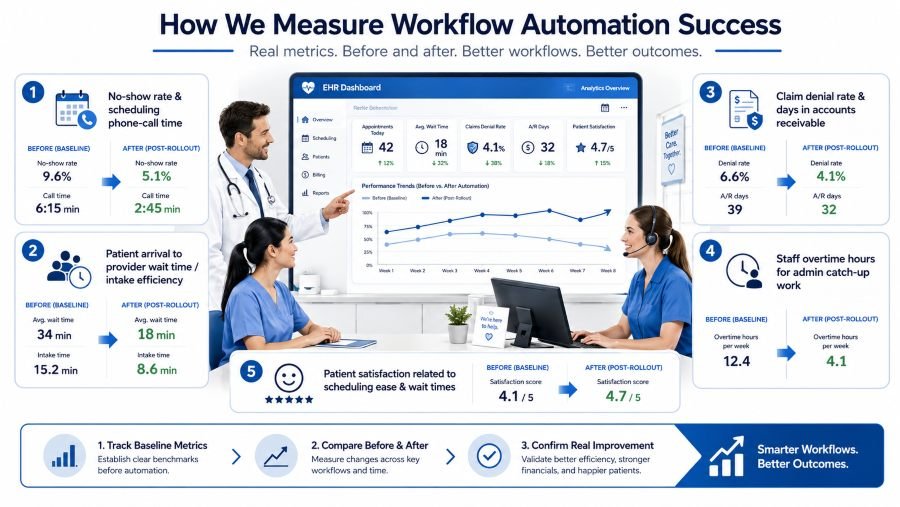
It is easy to assume automation is helping simply because a new system is in place. The more reliable approach is tracking a small set of operational metrics before and after rollout:
- No-show rate and time spent on scheduling-related phone calls
- Average time from patient arrival to provider seeing them, a good proxy for intake efficiency
- Claim denial rate and average days in accounts receivable
- Staff overtime hours tied to administrative catch-up work
- Patient satisfaction scores related to scheduling ease and wait times
Practices that see real gains from automation almost always have a baseline measurement to compare against. Without one, it becomes difficult to tell whether a new system is genuinely reducing work or simply moving the same work somewhere less visible.
Where to Start
Most organizations do not need to automate everything at once, and trying to usually backfires. The practices that see the strongest results tend to start with one clear bottleneck, often scheduling or claims processing, prove out the value, and expand from there with lessons already learned.
Choosing the right partner matters as much as choosing the right starting point. A healthcare software provider that understands clinical workflows, payer requirements, and EHR integration patterns will get you to a working system far faster than a generic automation vendor learning healthcare for the first time on your implementation.
The administrative weight on healthcare teams is not going away on its own. What is changing is how much of that weight technology can realistically carry, and the gap between practices that have automated their core workflows and those still running on manual processes is only going to widen from here.
Disclaimer
This article is for general information only. It is not medical, legal, billing, coding, compliance, or software advice. Healthcare providers should use AI workflow automation only with proper human oversight, data security checks, and compliance with applicable healthcare privacy laws and internal policies. Clinical decisions should always remain with qualified healthcare professionals.
References
- Himmelstein, D. U., Campbell, T., & Woolhandler, S. (2020). Health Care Administrative Costs in the United States and Canada, 2017. Annals of Internal Medicine, 172(2), 134–142. DOI: https://doi.org/10.7326/M19-2818
- Sinsky, C., Colligan, L., Li, L., Prgomet, M., Reynolds, S., Goeders, L., Westbrook, J., Tutty, M., & Blike, G. (2016). Allocation of Physician Time in Ambulatory Practice: A Time and Motion Study in 4 Specialties. Annals of Internal Medicine, 165(11), 753–760. DOI: https://doi.org/10.7326/M16-0961
- McLean, S. M., Booth, A., Gee, M., Salway, S., Cobb, M., Bhanbhro, S., & Nancarrow, S. A. (2016). Appointment Reminder Systems Are Effective but Not Optimal: Results of a Systematic Review and Evidence Synthesis Employing Realist Principles. Patient Preference and Adherence, 10, 479–499. DOI: https://doi.org/10.2147/PPA.S93046
- Lin, C. L., Mistry, N., Boneh, J., Li, H., & Lazebnik, R. (2016). Text Message Reminders Increase Appointment Adherence in a Pediatric Clinic: A Randomized Controlled Trial. International Journal of Pediatrics, 2016, 8487378. DOI: https://doi.org/10.1155/2016/8487378
- Boone, C. E., Celhay, P., Gertler, P., Gracner, T., & Rodriguez, J. (2022). How Scheduling Systems With Automated Appointment Reminders Improve Health Clinic Efficiency. Journal of Health Economics, 82, 102598. DOI: https://doi.org/10.1016/j.jhealeco.2022.102598