

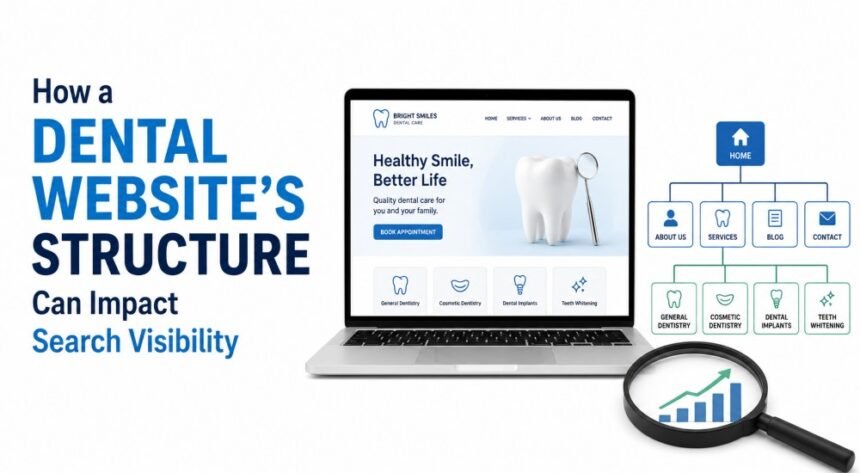
A dental website can look polished and still struggle to appear in search results. Design matters, but the way pages are arranged, connected, and labelled matters just as much. A clear structure helps patients find the right treatment information while giving search engines a better understanding of what the practice offers.
Good Structure Begins With the Patient’s Question
Most people do not visit a dental website to admire its design. They arrive with a question or an immediate concern.
They may want to know:
- Whether the practice offers emergency appointments
- How much a consultation may cost
- Whether the dentist provides implants or cosmetic treatments
- Where the clinic is located
- How soon they can book an appointment
A good website structure anticipates these needs. It places important information where people naturally expect to find it instead of making them search through crowded menus, vague page titles, or long service lists.
The top dental websites usually feel straightforward because each page has a clear purpose. Visitors can move from the homepage to a treatment page, read useful information, check the dentist’s credentials, and request an appointment without losing their place.
That simple journey benefits patients, but it also gives search engines clearer signals about the website’s subjects and page relationships.
Every Important Treatment Deserves Its Own Page
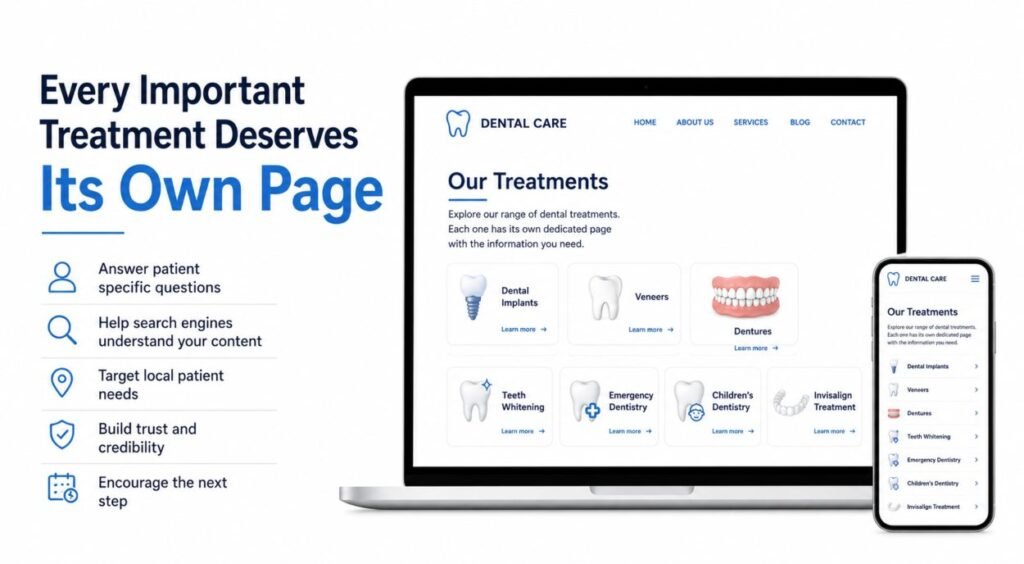
One common structural problem is placing every treatment on a single general services page. The page may mention implants, veneers, dentures, cleanings, and emergency dentistry in a few short paragraphs, but none of those treatments receives enough attention.
Separate service pages give each treatment room to answer the patient’s actual questions.
A dental implant page, for example, could explain:
- Who may be suitable for treatment
- What the consultation involves
- The main stages of the process
- Expected recovery and aftercare
- Frequently asked questions
- How to arrange an assessment
A teeth whitening page would address a different set of concerns. Keeping these topics separate helps search engines identify the main subject of each page and match it with more relevant searches.
Dedicated pages also give the practice an opportunity to target specific local needs. Instead of relying on one broad “Dental Services” page, the website can provide focused pages for services such as emergency dentistry, children’s dentistry, dental implants, or Invisalign treatment in the area served by the clinic.
This does not mean producing a thin page for every small variation of a keyword. Each page should represent a real service and provide enough original information to help a potential patient make an informed next step.
Clear Navigation Makes the Website Easier to Understand
The main navigation menu acts like a map. It shows visitors what the practice offers and gives crawlers a path to important pages.
A dental website does not need dozens of items in its main menu. Too many choices can make a website feel complicated, particularly for someone browsing on a mobile phone while dealing with dental discomfort.
A practical navigation menu might include:
- About the Practice
- Dental Services
- New Patients
- Patient Resources
- Locations
- Contact or Book an Appointment
Treatment pages can then sit under the Dental Services section. For example, the menu could group dental implants, teeth whitening, crowns, root canal treatment, orthodontics, and emergency care in one clearly labelled area.
The W3C guidance on website navigation recommends using meaningful structure and accessible navigation patterns. These practices help people using different devices and assistive technologies move through a website more confidently.
Labels should also describe the destination clearly. “Dental Services” tells people more than a vague label such as “Solutions.” “Meet Our Dentists” is more useful than “Our People.” Familiar wording reduces hesitation and makes the website easier to use.
Internal Links Build Useful Paths Between Pages
Internal links connect one page of a website to another. They help visitors find related information and allow search crawlers to locate pages that may not appear directly in the main menu.
Google’s official link best practices explain that links help Google find pages and understand their relevance. However, links are most valuable when they are included for a clear reason.
For example:
- An article about replacing a missing tooth can link to the dental implant page.
- A page about gum disease can link to periodontal treatment.
- The emergency dentistry page can link to contact details and opening hours.
- A new-patient page can link to payment information, registration forms, and directions.
- A dentist profile can link to the treatments that the dentist provides.
The wording of each link should tell the reader what comes next. “Read about dental implant treatment” is more descriptive than “click here.”
Internal links should never be inserted randomly to increase their number. A useful link answers the reader’s next likely question. When links follow that principle, the website begins to feel like a connected source of information rather than a collection of isolated pages.
A Logical Page Hierarchy Supports Crawling and Indexing
A strong dental website usually follows a simple hierarchy:
Homepage → Main Service Category → Individual Treatment Page
For example:
Homepage → Restorative Dentistry → Dental Crowns
This structure gives both visitors and crawlers a clear path from broad information to a more specific topic. Important pages should not be buried several levels deep or accessible only through the website’s internal search function.
Google’s Search Essentials explain the technical and content requirements that help web pages become eligible to appear in Google Search. A clear hierarchy does not guarantee rankings, but it can make important content easier to locate, crawl, and understand.
Breadcrumb navigation can also support this structure. A breadcrumb displayed on a crown treatment page might read:
Home > Dental Services > Restorative Dentistry > Dental Crowns
This allows visitors to move back to a broader section without repeatedly using the main menu. It also shows how the current page fits into the rest of the website.
Clean URLs Give Each Page a Clear Identity
Page addresses should be readable and consistent. A URL such as:
exampledental.com/services/dental-implants
is easier to understand than:
exampledental.com/page?id=274
Simple URLs help visitors recognise what a page covers before opening it. They are also easier to share in emails, appointment messages, social posts, and printed materials.
A dental website should use one consistent structure instead of mixing several patterns. Service pages might sit within a /services/ folder, dentist profiles within /dentists/, and educational articles within /blog/ or /patient-guides/.
Changing URLs without planning can cause broken links and lost traffic. When an existing page must move, the old URL should be redirected to the most relevant new page rather than sending everyone to the homepage.
Content Groups Can Strengthen Subject Coverage
A treatment page cannot answer every possible patient question without becoming difficult to read. Supporting articles can provide additional detail while keeping the main service page focused.
For example, a dental implant section might include articles about:
- Dental implant recovery
- Implant aftercare
- Replacing one missing tooth
- Dental implants compared with bridges
- Questions to ask during an implant consultation
These articles should link back to the main implant service page where appropriate. The service page can also link to the most useful supporting guides.
This creates a connected group of content around one subject. It helps visitors move from general research to information about the treatment offered by the practice.
The important point is usefulness. Publishing several articles that repeat the same basic information with slightly different titles can create unnecessary competition between pages. Each article should answer a distinct question.
Location Pages Need More Than a Changed Place Name
Practices with several clinics often create a page for each location. This can be helpful, but each page should contain information that is specific to that office.
A useful location page may include:
- The complete address
- Telephone number
- Opening hours
- Directions and nearby landmarks
- Parking or public transport information
- Dentists working at that location
- Treatments available there
- Accessibility details
- An appointment request option
Copying the same paragraph across several pages and changing only the city name provides little value. Patients need practical information about the office they plan to visit.
Location pages should also be linked from relevant treatment and contact pages. A visitor reading about emergency dentistry should be able to see which locations provide emergency appointments.
Sitemaps Help Highlight Important URLs
An XML sitemap provides crawlers with a list of URLs the website owner wants them to know about. It is particularly useful when a website is new, large, recently reorganised, or contains pages that are difficult to reach through internal links.
Google’s Sitemaps report allows verified website owners to submit a sitemap and check whether Google encountered processing errors.
A sitemap cannot repair a confusing website structure. It should support good navigation and internal linking rather than replace them. Important pages should still be accessible through normal links that both people and crawlers can follow.
After publishing or updating an important treatment page, the practice can also use the URL Inspection tool to check whether Google can access the URL and whether it may be indexable.
Structured Data Can Clarify Business Information
Structured data is code that describes page information in a standard format. For a dental practice, it can help identify details such as the organisation’s name, location, contact information, opening hours, and medical speciality.
The Schema.org dentistry vocabulary provides a recognised way to describe dentistry as a medical speciality. Structured data must match information visitors can actually see on the page. It should not contain misleading services, ratings, locations, or claims.
Structured data is not a replacement for clear page content. Search systems still need well-written service pages, accurate contact details, logical links, and a technically accessible website.
Accessibility Should Be Built Into the Structure
Dental websites serve people of different ages and abilities. Clear headings, descriptive links, keyboard-friendly menus, readable text, and properly labelled forms make the website easier for more people to use.
The W3C page structure guidance explains how properly organised headings and page regions can improve navigation and orientation.
Accessibility should be considered during planning rather than added after the website is complete. An accessible structure often benefits everyone. Clear labels help busy users. Good contrast improves mobile reading. Proper headings make long treatment pages easier to scan.
Mobile Structure Matters for Dental Patients

Many people search for a dentist on their phone, particularly when they need urgent help. The mobile version of the website should make essential actions easy.
Telephone numbers should be tappable. Appointment buttons should be visible without covering the content. Menus should open properly, text should remain readable, and important information should not be hidden inside difficult sliders or oversized pop-ups.
Performance matters too. The official Core Web Vitals guidance focuses on loading performance, visual stability, and responsiveness. Large photographs, heavy booking tools, and unnecessary animation can make a dental website slow or awkward to use.
A fast page cannot compensate for weak content, but a slow page can make good content frustrating to access.
Professional Support Can Prevent Structural Problems
A search-friendly website requires cooperation between the dental practice, content writer, designer, developer, and SEO professional.
The practice provides accurate information about treatments, dentists, policies, and locations. The content writer turns that information into useful patient-focused pages. The designer creates clear paths through the content, while the developer makes sure menus, links, forms, redirects, and technical elements work properly.
An experienced professional can also identify problems such as:
- Important pages buried too deeply
- Several pages targeting the same subject
- Broken internal links
- Duplicate location content
- Unclear menu labels
- Missing redirects
- Treatment pages with little useful information
- Appointment forms that are difficult to use on mobile devices
Correcting these issues early is usually easier than reorganising the entire website after hundreds of pages have been published.
Structure Creates the Foundation for Search Growth
A dental website’s structure does not work separately from its content, design, or technical performance. Each part supports the others.
Clear navigation helps people reach important information. Dedicated treatment pages give each service a clear purpose. Internal links connect related questions and services. Logical categories help crawlers understand how the website fits together. Accessible and mobile-friendly layouts make the information easier to use.
The result is not simply a website that looks organised. It is a website that helps a potential patient move from a question to a useful answer and, when ready, to an appointment. That is the kind of structure that can support stronger search visibility and sustainable online growth.